Most LinkedIn Showcase Pages die within a few months of launch. Not because the feature is broken. Because someone created one, posted twice, and forgot it existed.
If you're running more than one product line, business unit, or initiative under a single brand, a Showcase Page can genuinely help you speak to each audience separately. But it only works if you treat it like its own page, not a folder you dump extra content into. Here's what a LinkedIn Showcase Page actually is, how it's different from your main company page, how to set one up, when it's actually worth the effort, and when you shouldn't bother at all.
What Is a LinkedIn Showcase Page, Exactly?
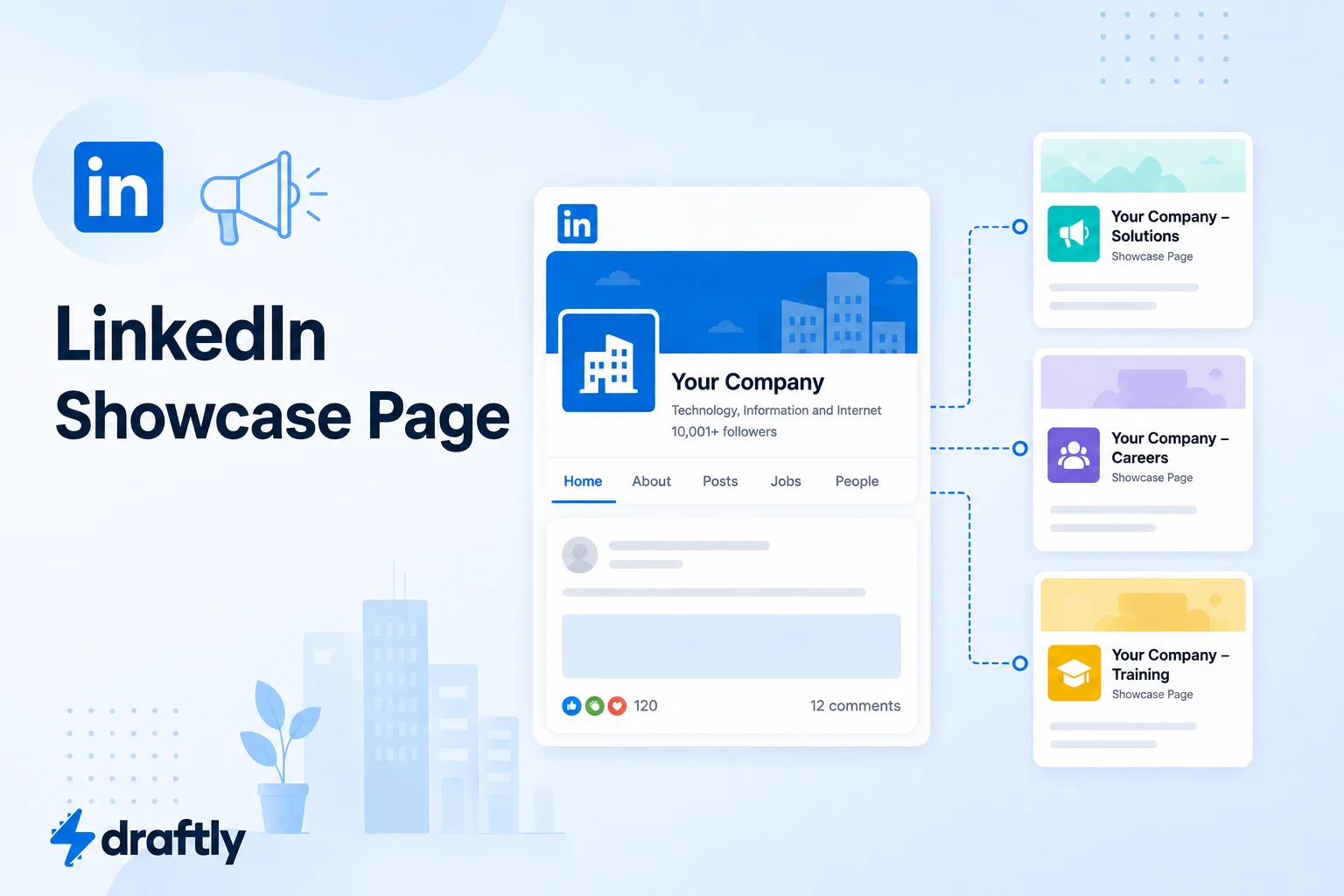
A LinkedIn Showcase Page is a sub-page attached to your main LinkedIn company page, built to spotlight one specific brand, product line, business unit, or initiative. Think of it the way you'd think about your website's homepage versus a dedicated landing page. The main company page carries your overall brand story, while a Showcase Page zooms in on one piece of it for the audience that cares specifically about that piece.
For example, a software company selling both a core platform and a newer AI add-on might keep general company news, hiring updates, and culture posts on the main page, then run a Showcase Page just for announcements about the AI product. Anyone who follows that Showcase Page never has to scroll past a post about the company holiday party to find what they actually signed up for.
Showcase Pages appear under the "Affiliated Pages" section of your main company page, so visitors who want the bigger picture can always find their way back to it. Each one gets:
- Its own name, logo, cover image, and "About" description
- Its own follower base (people can follow a Showcase Page without following your main page)
- Its own post feed and native analytics, kept separate from your company page's numbers
Takeaway: a Showcase Page isn't a second company page. It's a focused extension of the one you already have.
Showcase Page vs. Company Page: What Actually Changes
The two look similar at a glance, but a few real differences affect how you should use each.
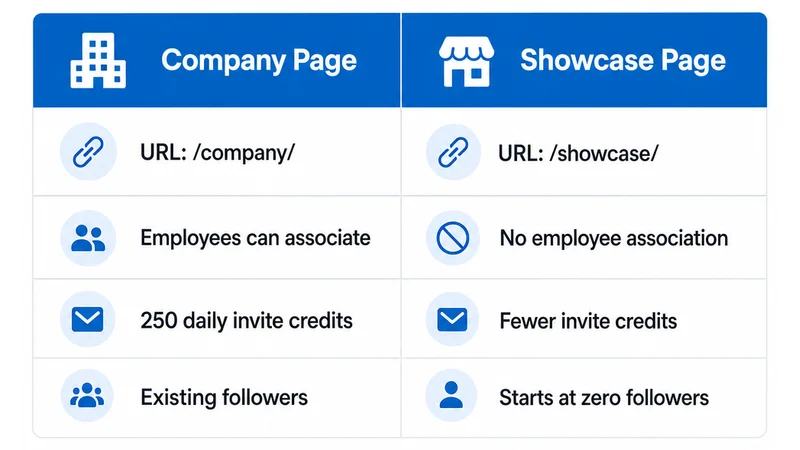
- URL structure: company pages live at /company/, Showcase Pages at /showcase/.
- Employee association: employees can list themselves as working at your company page. They can't be associated with a Showcase Page, which limits how much organic employee reach a Showcase Page can tap into.
- Invitation credits: your main company page gets 250 daily "invite to follow" credits; a Showcase Page gets fewer, so growing its follower base takes more organic effort.
- Follower inheritance: this is the big one. Showcase Page followers do not carry over from your main page. Every Showcase Page starts at zero, with no automatic audience.
That last point is exactly why so many Showcase Pages go quiet. If you're building out a broader LinkedIn B2B marketing strategy, a Showcase Page can be a smart addition to it, but only once the fundamentals of your main page are already working.
Takeaway: a Showcase Page inherits your brand's visuals, not your brand's audience. You have to build the follower base from scratch.
Real Ways Companies Use Showcase Pages
Showcase Pages work best when they solve an actual audience problem, not just because the option exists in the admin menu. A few realistic patterns worth borrowing:
- A company with two very different buyers. A cybersecurity vendor selling both to enterprise IT teams and individual developers might run one Showcase Page for the enterprise product and a separate one for the developer tool, since the two audiences want completely different content and neither wants to scroll past posts meant for the other.
- A services firm expanding into a new region. A consulting firm entering a new market can use a Showcase Page to post region-specific case studies, hires, and events, while keeping global brand updates on the main page.
- A recurring flagship event or community. A company that runs an annual conference or an online community can give it a Showcase Page, so people who only care about that program can follow it without subscribing to everything else the company posts.
In each case, the Showcase Page works because someone treats it like a small, focused publication with its own beat, not a dumping ground for whatever didn't fit on the main page.
Takeaway: the pattern behind every Showcase Page that actually works is the same: a specific audience, a specific topic, and someone accountable for feeding it regularly.
Should You Create One? When It Helps, and When It Doesn't
Showcase Pages make sense when you have an audience that genuinely wants updates about one part of your business and would rather not wade through everything else you post. Good candidates include:
- A distinct product line with its own buyers and use cases (e.g., a company with two very different software products)
- A business unit with a separate go-to-market motion from the parent brand
- A recurring initiative or program, like a conference, community, or partner ecosystem, that has its own updates worth following on their own
Showcase Pages are a weaker fit when:
- You're launching one campaign or event and don't plan to post beyond it. A company page post series does the job just as well, without fragmenting your audience.
- You're hoping to use it for geographic targeting. LinkedIn's own guidance is that Showcase Pages aren't built for regional segmentation; use post-level geo-targeting on your main page instead.
- You don't have anyone specifically responsible for feeding it content. A Showcase Page with no owner is how you end up with the three-post-and-silence pattern.
Takeaway: create a Showcase Page for a genuinely distinct audience with dedicated content, not as a place to park a one-off campaign.
How to Create a LinkedIn Showcase Page (Step by Step)
You'll need admin access on an established company page first. If you haven't set that up yet, creating your LinkedIn business page is the starting point. Once your main page is live:
- Go to your company page and open the admin tools menu (the dropdown near "Edit page").
- Select "Create a Showcase Page." This opens a setup flow that's separate from your main page's settings, so nothing about your existing page changes.
- Fill in the basics: page name, tagline, industry, website URL, logo, and cover image. Keep the name specific: "Acme Cloud Platform" tells people exactly what they're following, while "Acme Updates" doesn't tell them anything.
- Write a focused "About" section that explains what this page covers and why it's worth following separately from your main page. Treat it like a mini value proposition, not boilerplate copied from your company page.
- Assign a dedicated admin for the page: someone who's actually responsible for posting to it on a schedule, not whoever happened to click "create."
- Publish, then write and schedule your first few posts before you promote the page anywhere. An empty feed is the fastest way to lose a new follower who clicks through out of curiosity.
One limit worth knowing: LinkedIn currently allows up to 25 Showcase Pages per company page, but recommends staying well under that, closer to 10 or fewer, since every additional page splits your audience and your team's attention a little thinner.
Takeaway: the setup itself takes minutes. The follower base and content plan behind it are what actually take work.
What to Post on a Showcase Page
The content that works on a Showcase Page is narrower and more specific than what you'd post on your main page. That's the whole point of having a separate one. Strong options include:
- Product or feature updates relevant to that specific line or unit, including smaller releases that wouldn't justify a post on the main page
- Case studies and customer stories tied directly to that product or initiative
- Event and program recaps if the page exists to support a recurring initiative
- Niche industry commentary that your main page audience might not care about, but this page's followers signed up for specifically
- Behind-the-scenes updates from the team running that specific product or program, giving followers a reason to check in beyond formal announcements
Here's a simple opening line you can adapt for a Showcase Page's first post:
"We built [Page Name] because [specific audience] kept asking us about [specific problem], separately from everything else we do at [Company]. Follow along here for updates that are just about that."
Takeaway: if a post would work equally well on your main page, it probably belongs there instead. Save the Showcase Page for content only its specific audience wants.
Can You Run LinkedIn Ads on a Showcase Page?
Yes. Showcase Pages support sponsored content the same way company pages do, so you can put budget behind a post to grow that page's specific following or promote something tied to it. This pairs well with a targeted LinkedIn ads for B2B approach, since you can point ad spend at exactly the audience segment that page was built for, instead of running everything through your main company page.
Takeaway: paid promotion is often what actually gets a new Showcase Page past the "zero followers" problem. Organic reach alone rarely does it.
How to Measure Whether a Showcase Page Is Working
Since a Showcase Page's analytics are tracked separately from your main page's, you have to actually check them on their own to know if the page is earning its place. A few tools in this LinkedIn analytics tools roundup can help you track multiple pages side by side instead of jumping between LinkedIn's native dashboards. Focus on three things:
- Follower growth rate, not just total followers. A page that gained 40 followers in its first month and 2 in its sixth month is losing momentum, even if the total count still looks fine on paper.
- Engagement rate relative to your main page. If a Showcase Page's posts consistently get lower engagement than equivalent posts on your main company page, its audience may not be as distinct as you assumed, and the content might belong on the main page instead.
- What happens after someone follows. Are people who follow the Showcase Page later engaging with your main page, clicking through to your site, or converting into leads? A page that grows followers but produces no downstream activity is a vanity metric, not a channel.
Check these numbers on a set schedule, quarterly is reasonable for most teams, rather than only when someone happens to ask how the page is doing.
Takeaway: a Showcase Page's follower count means very little on its own. Growth trend and what happens after the follow are what actually tell you if it's working.
Showcase Page Best Practices
- Cap it at a handful of pages. Even though LinkedIn technically allows up to 25, most companies do better with two or three well-run Showcase Pages than ten neglected ones.
- Make sure your main page is strong first. A Showcase Page borrows credibility from your company page, so growing your business page on LinkedIn should come before you spin off a satellite page.
- Give each page its own voice within your brand guidelines. Same logo and color palette, different tone and topics if the audience calls for it.
- Post on a real schedule, not "whenever something comes up." A Showcase Page that posts monthly will lose followers faster than one that never launched.
- Review the analytics quarterly. If a page's follower growth and engagement have flatlined for two straight quarters, that's your signal to either recommit to it or fold its content back into your main page.
Takeaway: a Showcase Page is only as strong as the page it's attached to and the person actually running it.
Common Showcase Page Mistakes to Avoid
- Creating one for every product, campaign, or team. Audience fragmentation is real: followers can only spread their attention across so many pages before they stop following any of them closely.
- Assuming followers will transfer from the main page. They won't. Every Showcase Page starts at zero and needs its own promotion plan.
- Launching without an owner. If no single person is accountable for posting, the page goes dormant within a quarter.
- Using it for geo-targeting. That's not what it's built for. Use LinkedIn's post-level location targeting on your main page instead.
- Never revisiting performance. A Showcase Page you set up two years ago and haven't checked since is either quietly working or quietly dead, and you won't know which without looking.
Takeaway: most Showcase Page failures are ownership failures, not platform failures.
Conclusion
A LinkedIn Showcase Page can genuinely sharpen how you reach a specific audience, but only if you treat it as a real page with its own content plan and owner, not a place to park an afterthought. Start with one focused page, give it a few months of consistent posting, and expand only if it's actually earning its keep.
If keeping even one extra LinkedIn page consistently active feels like more than your team has bandwidth for, Draftly's free plan can help you plan and schedule content across your company and Showcase Pages without adding to anyone's daily workload.