You post consistently. You put real thought into every caption. And somehow, it still feels like the same 200 or so people are seeing it every time.
Sound familiar? The problem probably isn't your content. It's your reach. Getting a handle on how LinkedIn decides who sees your posts, and how you can actually influence that, is the difference between shouting into an empty room and being heard by the audience you're trying to build.
This guide walks through what LinkedIn reach actually means, how it's different from the other numbers sitting in your analytics tab, and what you can realistically do to grow it in 2026.
All of this ties back to one thing: what LinkedIn's algorithm is actually looking for when it decides who gets to see your post.
What Does "Reach" Mean on LinkedIn?
Reach is simply the number of unique people who saw your post, whether that was in their feed, a notification, or a search result. It doesn't matter how many times any one person saw it. Reach only counts each person once.
That distinction matters, because it's easy to mix reach up with two other numbers sitting right next to it in your post analytics.
Reach vs. Impressions vs. Engagement Rate
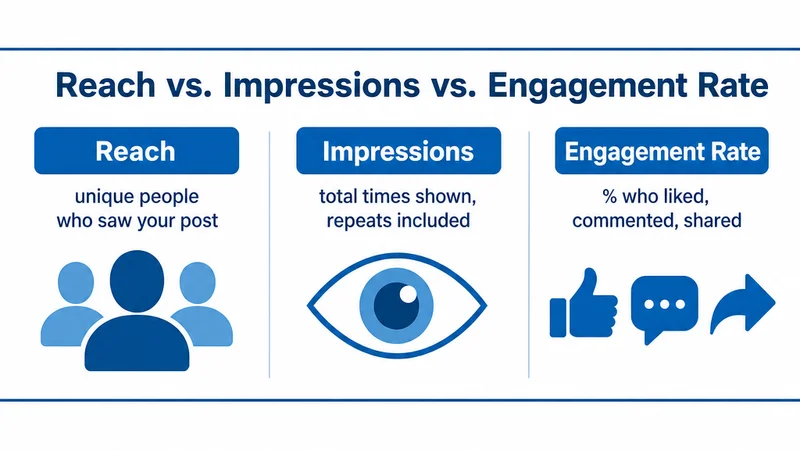
- Reach is the unique people who saw the post.
- Impressions is the total number of times the post was displayed, including repeat views from the same person.
- Engagement rate is how many of those viewers actually did something: liked, commented, shared, or clicked.
So you can end up with high impressions but flat reach if the same small group keeps seeing your post over and over. That's usually a sign your content isn't getting pushed to anyone new, and it's worth understanding why impressions can spike without reach following along before you assume a post is actually performing well.
Takeaway: if impressions are climbing but reach is flat, your content is getting recycled to the same pool of people. You need to change what signals you're sending the algorithm, not just post more often.
How LinkedIn Decides Who Sees Your Post
LinkedIn doesn't push your post out to everyone at once. It first shows it to a small test group made up of your connections and followers. If that group engages quickly (likes, comments, and especially comments with some substance to them), the algorithm reads that as a green light and expands distribution to a second, larger circle: people outside your direct network who follow related topics or hashtags.
This is why the first 60 to 90 minutes after you hit publish matter so much. It's also why dwell time, meaning how long someone actually lingers on your post before scrolling past, has become one of the strongest ranking signals LinkedIn uses.
How to Increase Your LinkedIn Reach
Here's what actually moves the needle, roughly in order of impact.
1. Post at the Right Time
Reach compounds during that early test window, so posting when your specific audience is actually online gives the algorithm more to work with, faster. There's no universal "best" time. It really depends on your audience's industry and time zone, which is why finding your own optimal posting window matters more than copying someone else's schedule.
2. Use Hashtags with Intent
Hashtags are one of the few levers you have for reaching people outside your existing network, since they're how LinkedIn categorizes your post for topic-based distribution. The trick is being selective. Three to five relevant hashtags that actually match your niche will outperform ten generic ones almost every time.
3. Reply to Every Comment in the First Hour
Every reply you leave is its own small engagement signal, and it keeps the conversation active at the top of the comment section, which pulls more people in. This is honestly the single highest-leverage 15 minutes you'll spend all day, and replying well is a skill worth building, on your own posts and other people's.
Try this: instead of a generic "Thanks!" reply, ask a follow-up question back. Something like:
"Really glad this landed. Curious, have you run into this with your own team, or is it more of an industry-wide pattern you're noticing?"
That kind of reply almost always pulls a second comment out of them, which stretches the engagement window even further.
4. Aim for Engagement, Not Just Views
Reach and engagement feed each other. More engagement early on tells the algorithm to widen distribution, which then creates more opportunities for engagement. There's a whole set of prompts that reliably pull people into the comments, but the simplest one is ending your post with a genuine, specific question instead of a generic "thoughts?"
5. Post Native Video or Documents
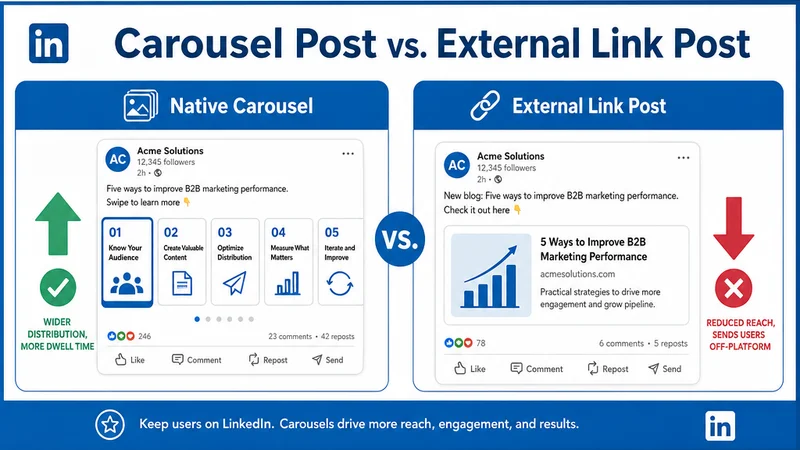
The algorithm favors formats that keep people on the platform. Native video and native "document" posts, like carousels or slide-style PDFs, tend to hold attention (and dwell time) a lot longer than a plain text post or an external link.
Takeaway: none of these tactics work in isolation. They're meant to stack. Post at the right time, with the right hashtags, in a format that holds attention, then spend the first hour actively steering the conversation.
Mistakes That Quietly Kill Your Reach
A few habits can cap how far your posts travel without you noticing:
- Editing the post right after publishing. The algorithm tends to treat heavily edited posts with suspicion, which can throttle distribution mid-cycle.
- Putting an external link directly in the post body. LinkedIn deprioritizes posts that send people off-platform. Drop the link in the first comment instead.
- Posting too infrequently. Reach builds partly on consistency. The algorithm has a lot less to work with if you post once a month instead of on a steady weekly cadence.
How to Track Your LinkedIn Reach
You'll find reach broken out per post in LinkedIn's native analytics (click into any post, then "View analytics"). The tricky part is doing this consistently across dozens of posts to actually spot patterns over time. Draftly's scheduling tool surfaces reach, impressions, and engagement side by side for every post you publish, so you can see what's actually working without digging through LinkedIn's dashboard one post at a time.
Conclusion
LinkedIn reach really comes down to one thing: giving the algorithm enough of a reason, early, to put your post in front of more people. Post at the right time, use hashtags with intent, drive real conversation in that first hour, and lean on formats that hold attention. Then actually track what's working instead of guessing.
If you'd rather stop guessing altogether, Draftly's free plan gives you per-post reach and engagement tracking right alongside your scheduling, so you can see exactly which posts are earning wider distribution and do more of that.