Nearly 3,500 people search for this exact phrase every month, and half of them are really asking a different question underneath it: will this green badge actually help me get hired, or will it just tell my boss I'm job hunting?
Both concerns are fair. Open to Work is one of LinkedIn's most visible features and one of its most debated. Recruiters have opinions about it. Reddit threads argue about whether it's a "red flag." LinkedIn offers a recruiters-only setting that limits visibility, but it does not guarantee privacy.
Here's what the feature does, how to turn it on the right way, and how to decide whether it belongs on your profile at all.
What Is LinkedIn Open to Work?
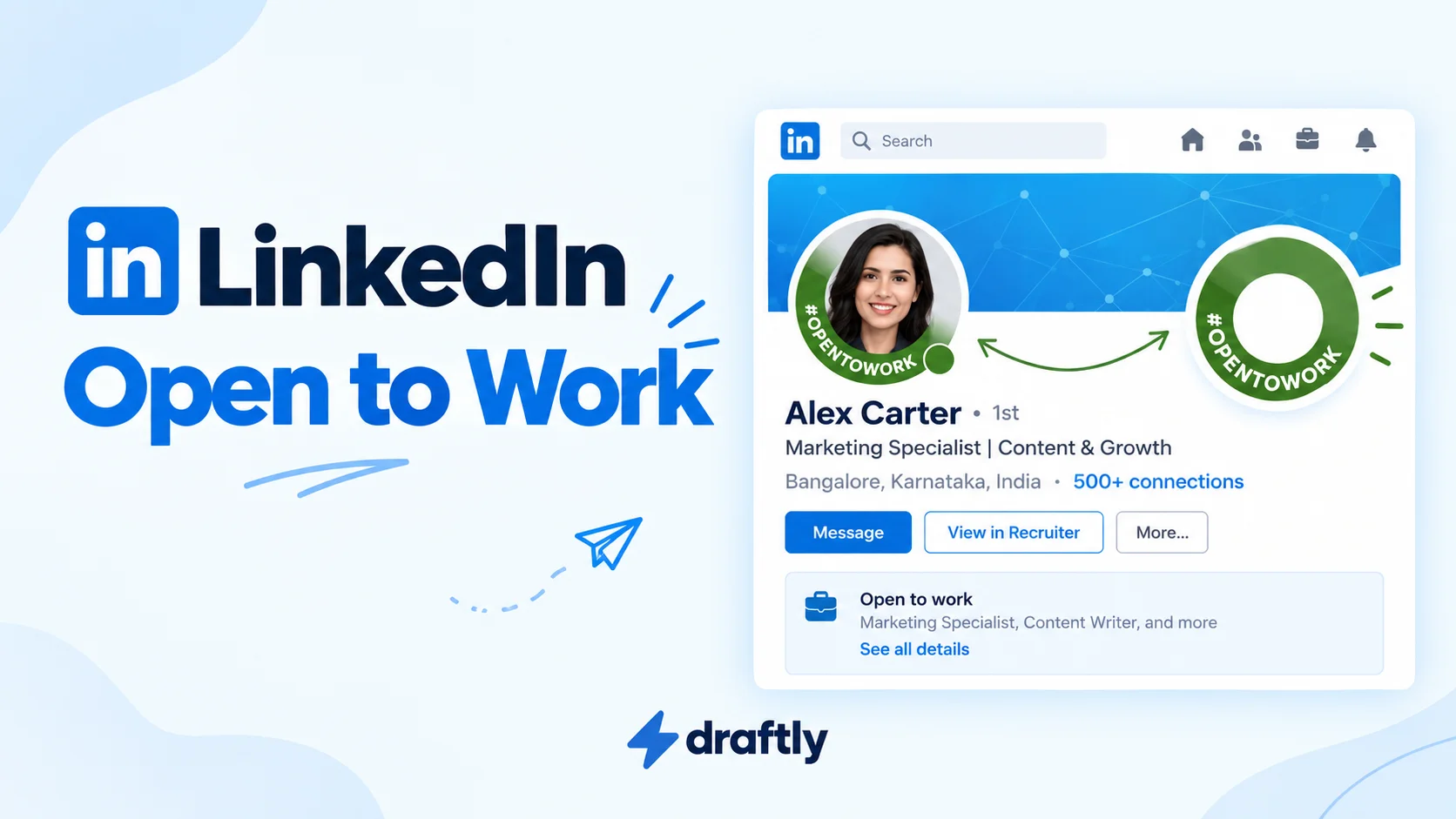
Open to Work is a profile setting that signals you're looking for a new job. When you turn it on, you specify the job titles, locations, and work arrangements you want and choose who can see that you're open to opportunities. A public photo frame is added only if you choose "All LinkedIn members."
There are two ways to share that you're open to opportunities. LinkedIn Help also lists "Visible only to you," which uses your preferences to tailor job recommendations rather than share them with recruiters:
The green photo frame. A ring around your profile picture with "#OpenToWork" written across it. Anyone on LinkedIn can see this, including coworkers, your manager, and clients.
Recruiters-only visibility. Your career interests are shared with people using LinkedIn Recruiter, without a public #OpenToWork photo frame. LinkedIn does not describe this option as a private gray banner. It takes steps to hide those interests from recruiters at your current employer and related companies, but cannot guarantee complete privacy.
The distinction between these two matters more than most guides let on, and it's the first decision you'll make when you turn the feature on. It's also just one piece of a bigger picture: how you handle Open to Work should fit into optimizing your profile as a whole, not sit apart from it.
Takeaway: Open to Work has different visibility settings, and choosing who can see your career interests matters more than the appearance of a badge.
How to Turn On Open to Work
The setup takes about two minutes on desktop or the mobile app.
- Go to your profile and click the "Open to" button just below your profile photo (it also appears as a plus icon on mobile).
- Select "Finding a new job."
- Fill in your job preferences: titles you'd consider, locations (or remote), and start date.
- Choose your visibility: "All LinkedIn members" for the public green frame, or "Recruiters only" to share your career interests with LinkedIn Recruiter users without a public frame. Recruiters-only visibility is not a confidentiality guarantee.
- Click "Save." LinkedIn's current Help instructions use this button to confirm your preferences. The #OpenToWork photo frame is added if you choose "All LinkedIn members"; recruiters-only visibility does not add that public frame.
You can come back and edit any of these details later, including switching from public to recruiters-only visibility without turning the feature off completely.
Takeaway: The setup itself is simple. The visibility choice you make in step four is the part worth slowing down for.
Public vs. Recruiters Only: Choosing Your Visibility Setting
This is the decision that actually matters, and it comes down to who you're comfortable having see your job search.
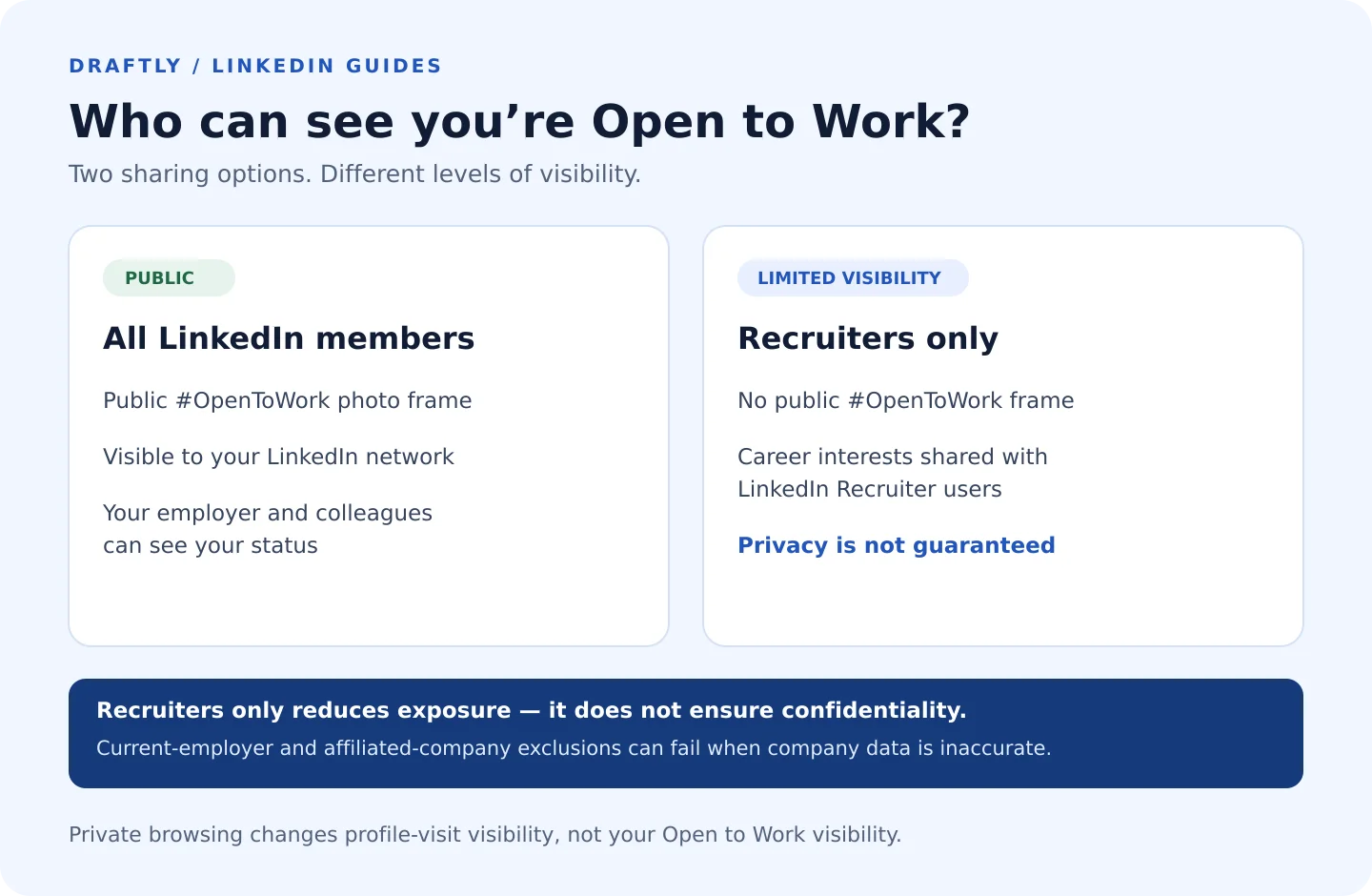
Choose "All LinkedIn members" when you're not employed, your employer already knows you're leaving, or you work in a field like sales or agency services where being visibly available is normal and even helpful.
Choose "Recruiters only" when you're currently employed and want to limit the visibility of your search, your industry is small enough that a public badge would get back to your manager, or you're testing the market without fully committing to a move. Do not rely on this option if your search must remain completely confidential.
Open to Work visibility and your private mode settings are separate controls. Private mode changes how you appear in someone's "Who's Viewed Your Profile" list when you visit their profile. It does not change who can see your Open to Work status or hide that status from recruiters or your employer.
Takeaway: Recruiters only isn't a weaker version of the feature. For anyone currently employed, it's usually the smarter default.
Does Open to Work Actually Work?
This is where the evidence gets mixed, and most articles skip it entirely.
On one hand, LinkedIn's own data shows Recruiter users can filter specifically for Open to Work candidates, so the badge does put you in front of people actively sourcing. On the other hand, plenty of recruiters say they barely notice the frame anymore because so many profiles have it, and a handful even report treating it as a weak signal rather than a strong one.
What seems to matter more than the badge itself is what's behind it. A candidate with a green frame and a thin, outdated profile gets skipped. A candidate with a strong headline, a complete experience section, and recent activity gets a second look, badge or not. The setting opens a door. It doesn't walk you through it.
Takeaway: Open to Work increases your chances of being found. It does nothing for what happens after you're found, which is on the rest of your profile.
Is Open to Work a Red Flag?
Short answer: not inherently, but context shapes how it reads.
Some hiring managers still associate the public badge with layoffs or difficulty finding work, which is an outdated but real bias. Others see it as smart, proactive career management, especially for recent graduates, freelancers, or anyone in a field where movement between roles is normal.
The honest middle ground: if you're worried about how the badge looks, "Recruiters only" avoids the public green photo frame, but recruiters using LinkedIn Recruiter may still see your career interests, and confidentiality is not guaranteed. Save the public frame for situations where visibility matters more than optics, like an active, urgent search where you need every possible lead.
Takeaway: The badge itself isn't the red flag. An outdated profile behind it is.
How Recruiters Find Open to Work Candidates
Recruiters using LinkedIn Recruiter (the paid product, not a regular account) can filter search results specifically to show candidates with Open to Work enabled, sorted by the job titles and locations you specified in your setup. This is separate from a regular search, which means turning the feature on genuinely changes who can find you, not just what they see once they do.
This is also why filling out the job preference details in step three matters more than people expect. A vague or empty preferences form means you show up in fewer of these filtered searches, even with the badge turned on.
Takeaway: The badge gets you noticed. The preferences form determines whether you get noticed by the right people.
Best Practices If You Turn It On
A few habits separate people who get real leads from Open to Work versus those who just have a green ring around their photo.
- Fill out every field in the preferences form, not just job title. Location and work arrangement filters are how recruiters narrow searches, and a blank field can exclude you from results entirely.
- Update your headline before you turn it on. A headline that just repeats your last job title wastes the attention the badge earns you. If you're stuck, a headline generator can get you unstuck in a couple of minutes.
- Keep posting and commenting, not just waiting. A badge with no recent activity looks stalled. A badge next to a profile that's actively sharing insights in your field looks like someone worth reaching out to.
- Reassess visibility if your situation changes. Switching from public to recruiters-only takes seconds and is worth doing the moment discretion starts to matter more than reach.
Takeaway: The badge does the initial work of getting you into searches. Everything else on your profile decides what happens next.
Will Your Current Employer or Colleagues See It?
With "All LinkedIn members," anyone on LinkedIn can see your Open to Work status and photo frame, including your employer and colleagues. With "Recruiters only," there is no public frame, and your shared career interests are limited to LinkedIn Recruiter users. LinkedIn takes steps to exclude recruiters at your current company and related companies, using the current employer marked "I am currently working here" on your profile and its company mappings. Those mappings and recruiters' employer information can be inaccurate, so LinkedIn explicitly cannot guarantee complete privacy.
There's a separate privacy question worth understanding here too: people whose profiles you visit may see your identity depending on your browsing settings. If keeping a low profile during your search matters to you, check your profile-view privacy as well as your Open to Work visibility. Private mode controls your identity in profile-view records; it does not make Open to Work more private.
Takeaway: Recruiters-only visibility reduces exposure, but it is not a guarantee that your employer or colleagues won't learn about your search.
When (and How) to Turn It Off
Once you've accepted an offer or paused your search, taking the badge down keeps your profile accurate and avoids fielding messages about a search that's already over. The process is quick: open the same "Open to" section, and either remove the preferences entirely or switch visibility to hide the public frame while keeping your details saved.
For the full walkthrough, including how to hide just the green frame without losing your saved preferences and a decision framework for which option fits your situation, here's how to remove it on desktop, iPhone, and Android.
Takeaway: Turning it off is faster than turning it on, and there's more than one way to do it depending on how much you want to keep.
Conclusion
Open to Work does one job well: it puts you in front of recruiters actively searching LinkedIn Recruiter for candidates like you. Whether it helps beyond that comes down to the visibility setting you choose and how complete the rest of your profile is behind it.
Turn it on with intention, pick the privacy level that matches your situation, and treat it as one part of a job search rather than the whole strategy. If staying visible to your network through consistent posts and comments is the part you keep putting off, a content scheduling tool can keep that side running without it becoming a second job search of its own.