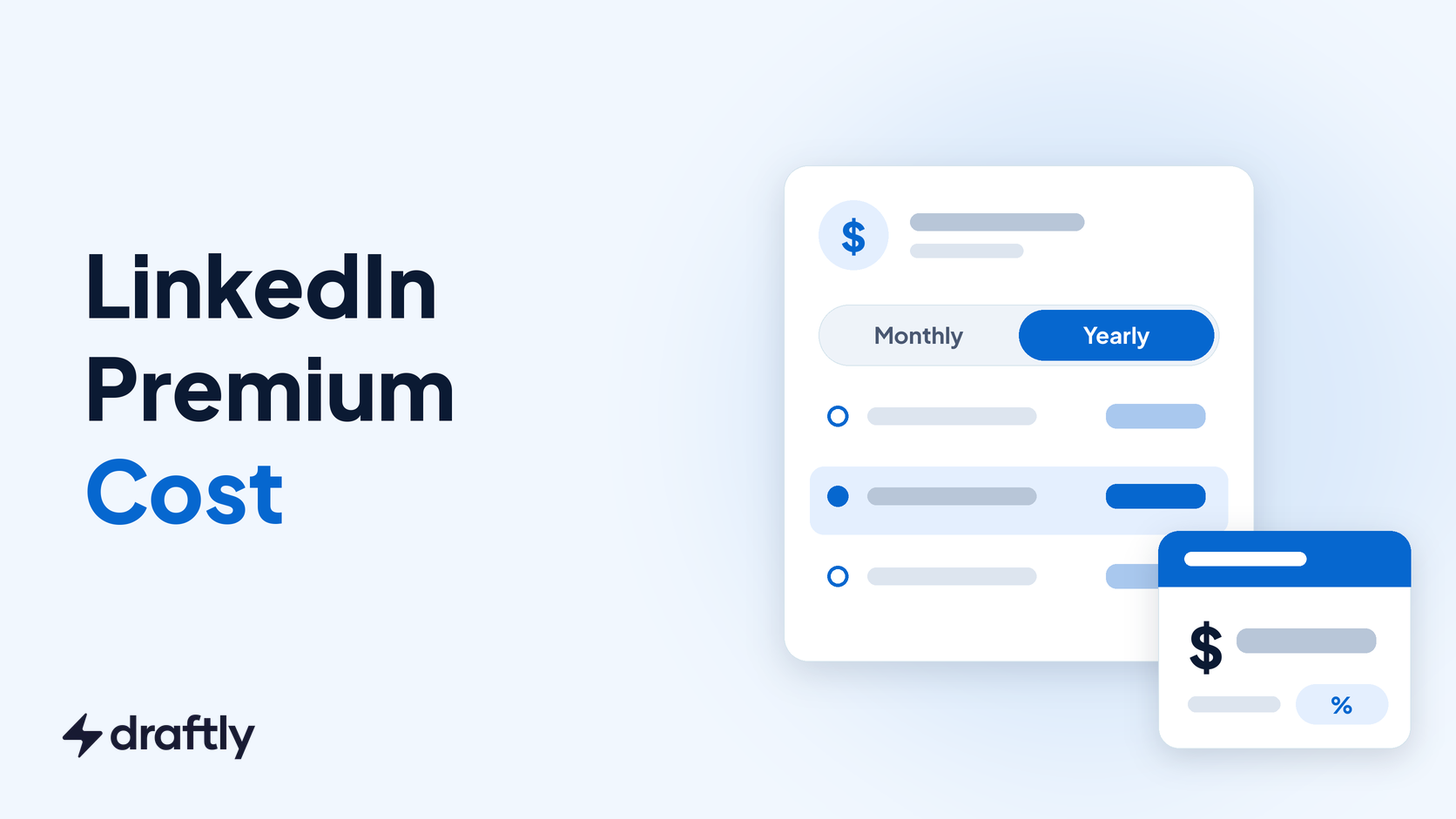
LinkedIn Premium costs $39.99 a month for Premium Career, $69.99 a month for Premium Business and $89.99 a month for Premium All-in-One, before tax. Pay for a year up front and Career drops to $239.88, which works out to $19.99 a month.
Those are the US list prices on LinkedIn's own plan pages. Sales Navigator and Recruiter Lite cost more, and what you pay at checkout can shift with your country, taxes and the device you buy on.
This guide lists every plan's monthly and yearly price, shows when yearly billing pays off, explains the cheaper Duo option most price guides skip, and walks through the free trial and refund rules so you don't pay for a month you didn't use.
How Much Is LinkedIn Premium? Every Plan at a Glance
LinkedIn sells four Premium plans for individuals and small businesses, plus Sales Navigator and Recruiter Lite, which people often lump in with Premium. Here's what each one costs in the US, per license:
| Plan | Billed monthly | Billed yearly | InMail credits a month | Built for |
|---|---|---|---|---|
| Premium Career | $39.99 | $239.88 | 5 | Job seekers |
| Premium Business | $69.99 | $539.88 | 15 | Networking, research, light outreach |
| Premium All-in-One | $89.99 | $899.88 | 30 | Small businesses that also hire and boost posts |
| Premium Company Page | $99.99 | $839.88 | Not applicable | Company Page admins |
| Sales Navigator Core | $119.99 | $1,079.88 | Not listed on the plan page | Sales prospecting |
| Sales Navigator Advanced | $159.99 | $1,799.88 | Not listed on the plan page | Sales teams |
| Recruiter Lite | About $170 | Shown at checkout | 30 | Hiring managers and small recruiting teams |
The Premium prices come from LinkedIn's pages for Premium Career, Premium Business, Premium All-in-One and Premium Company Page. Sales Navigator prices are on its compare plans page, and the 30 monthly InMails for Recruiter Lite are on the Recruiter Lite product page.
LinkedIn doesn't print a Recruiter Lite price on that page. Two recent pricing guides, from Dover and La Growth Machine, both put it at $170 a month, so treat that as a guide and confirm it at checkout.
You'll still find posts quoting lower, older prices for Career and Business. Go by the plan pages, not a cached screenshot.
Takeaway: If you only need one number, Premium Career is $39.99 a month or $239.88 a year in the US.
What Each LinkedIn Premium Plan Costs and What You Get
The price gap between plans is mostly about two things: how many people you can contact outside your network, and whether the plan is built around your profile or your business.
Premium Career: $39.99 a month or $239.88 a year
Career is the job seeker plan. You get 5 InMail credits a month, the list of who viewed your profile, job match insights, advanced job search filters and access to LinkedIn Learning's library of more than 25,000 courses.
If you're only curious about profile viewers, check what the free account already shows first. Our guide to what free accounts can see about profile viewers covers the difference.
Premium Business: $69.99 a month or $539.88 a year
Business triples the InMail allowance to 15 credits a month and removes the search limits on people and companies. It also adds a custom call to action button that shows on your profile, posts and messages, plus the same LinkedIn Learning access.
That makes Business the plan to look at if you spend a lot of time searching LinkedIn for specific people and keep running into search limits on a free account.
Premium All-in-One: $89.99 a month or $899.88 a year
All-in-One is only rolling out to a limited group of members, so you may not see it at all. It comes with 30 InMail credits a month, $50 in post boosting credits and $50 in hiring credits every month, and 15 daily prospect suggestions.
Yearly subscribers get $600 in boosting credits and $600 in hiring credits up front. If you'd spend that much on boosts and job posts anyway, the credits are worth more than the $899.88 plan price.
Premium Company Page: $99.99 a month or $839.88 a year
This one upgrades a Company Page rather than your personal profile. It adds features like auto-invites to people who engage with your Page's content, a custom call to action button, testimonials and competitor insights.
It isn't bundled with All-in-One. You add it separately, and eligible Page admins can try it free first.
Takeaway: Pick the plan by the job you need done: Career to get hired, Business to search and message freely, All-in-One if you'll use the boosting and hiring credits.
Is Sales Navigator or Recruiter Lite Part of Premium?
Not quite. They're separate paid products that sit alongside Premium, and they're priced for teams with a sales or hiring budget.
- Sales Navigator Core costs $119.99 a month or $1,079.88 a year, a 25% saving for paying yearly.
- Sales Navigator Advanced costs $159.99 a month or $1,799.88 a year, which saves only 6%.
- Sales Navigator Advanced Plus has no public price. LinkedIn quotes it based on team size, CRM integration and onboarding needs.
- Recruiter Lite runs about $170 a month and includes 30 InMails a month per license.
If you're weighing Sales Navigator, the cost only makes sense when you have a repeatable prospecting routine. Our walkthrough on using Sales Navigator to find and convert leads shows what that routine looks like day to day.
Takeaway: If your goal is a job or a stronger profile, you don't need either of these; they're priced for people who sell or hire every week.
Monthly vs Yearly Billing: How Much You Save
Every plan is cheaper per month when you pay for a year, but the discount varies a lot between plans. Career gets the biggest cut, while Sales Navigator Advanced barely moves.
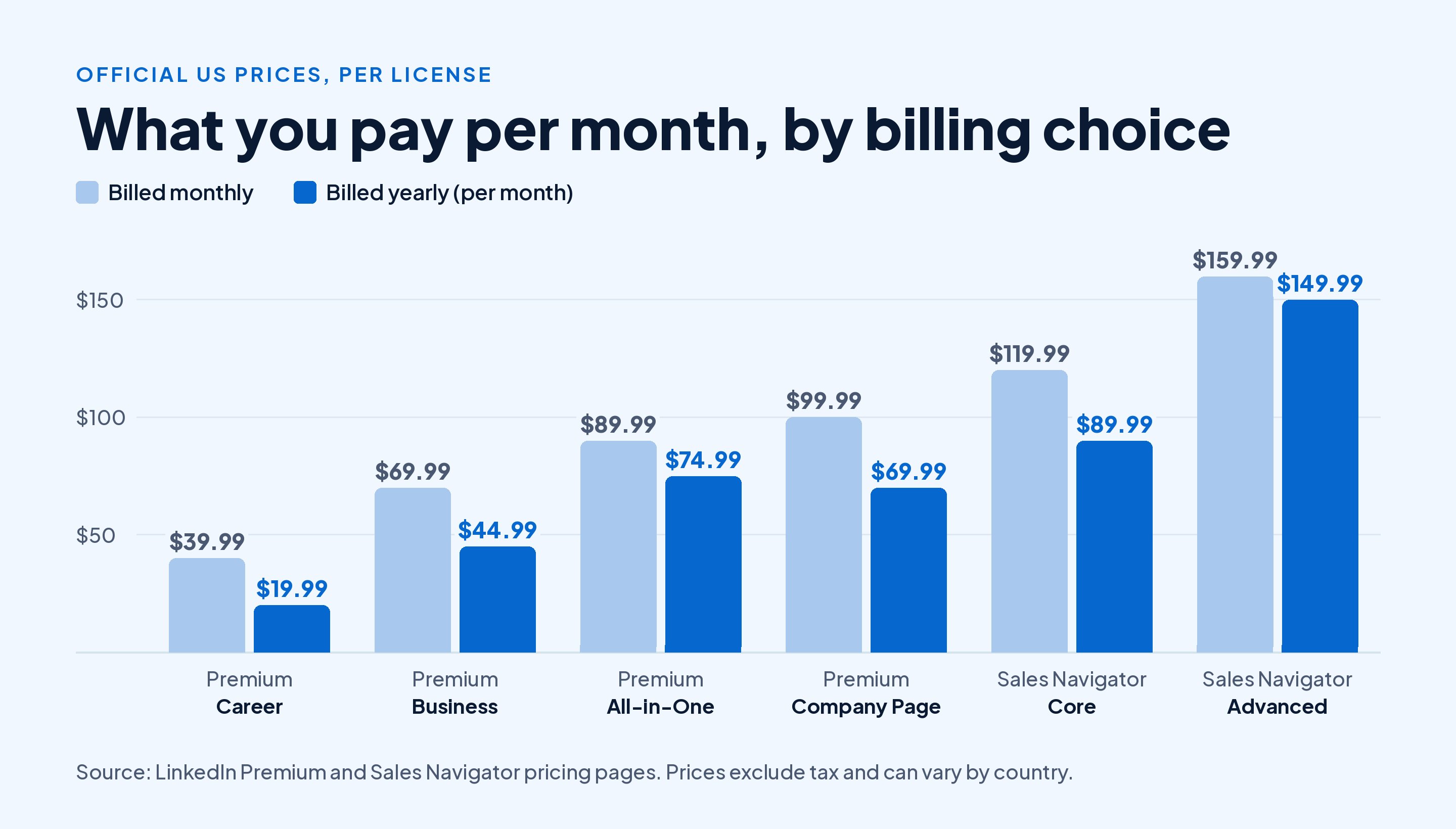
In dollars, paying yearly saves you $240 on Career, $300 on Business, $180 on All-in-One, $360 on Premium Company Page, $360 on Sales Navigator Core and $120 on Sales Navigator Advanced, compared with paying monthly for 12 months.
The catch is commitment. A yearly plan only saves money if you keep it long enough, and most people buy Premium for a job search or a sales push that has an end date.
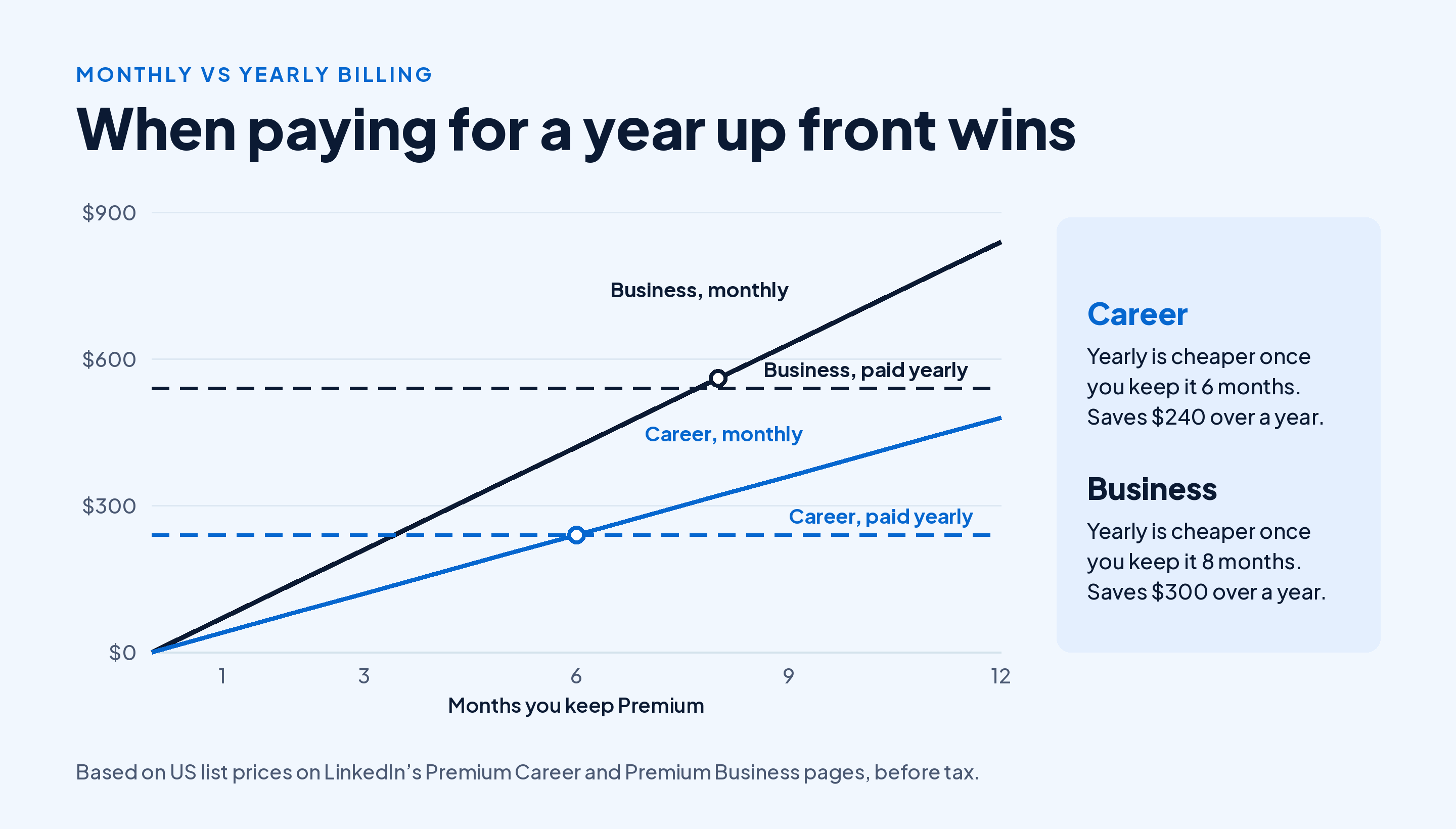
Here's the rule of thumb. Paying monthly for Career costs more than the yearly price once you hit month 6. For Business, monthly billing overtakes the yearly price at month 8.
So if you expect to land a job in three months, pay monthly and cancel. If LinkedIn is part of how you work all year, the yearly plan is the cheaper way in.
Takeaway: Go yearly only if you're confident you'll keep Premium for at least 6 months on Career or 8 months on Business.
The Duo Option: Two Premium Licenses for Less
LinkedIn now sells a Duo option for Premium Career and Premium Business. It gives two people their own Premium license under one shared subscription, at a lower combined price.
| Plan | Two single licenses, monthly | Duo, monthly | Duo, yearly |
|---|---|---|---|
| Premium Career | $79.98 | $59.98 | $359.88 |
| Premium Business | $139.98 | $118.98 | $917.98 |
For Career, that's $29.99 a month each instead of $39.99. If you and a partner, friend or cofounder are both job hunting or both doing outreach, Duo cuts the cost without anyone sharing a login.
Each person gets their own license with full access to the plan's features. You're sharing the bill, not the account.
Takeaway: If two people in your household or team want the same plan, check the Duo price before you buy two separate licenses.
LinkedIn Premium Cost Outside the US
LinkedIn prices Premium in local currency, and the numbers aren't straight conversions of the US price. Here's Premium Career in the five currencies LinkedIn lists on its Career page:
| Currency | Monthly | Yearly |
|---|---|---|
| US dollar | US$39.99 | US$239.88 |
| British pound | £29.99 | £179.88 |
| Euro | €29.98 | €179.88 |
| Canadian dollar | C$49.99 | C$299.88 |
| Australian dollar | A$54.99 | A$323.88 |
These figures may exclude VAT or GST, so expect the checkout total to be higher in countries that add sales tax to digital subscriptions.
In other countries, including India, LinkedIn shows the local price once you sign in and click the trial or upgrade button. That's the only price that counts, because it includes your region's adjustments and any promotion you qualify for.
Takeaway: Check the price while signed in, on the web, in your own country, before you trust any number in a blog post, including this one.
Why the LinkedIn Premium Price Can Differ on Your Phone
Premium prices can vary slightly across device types. So the price you see when you upgrade inside the iPhone or Android app may not match the web price.
To see the price you'll pay before you commit:
- Open LinkedIn in a browser on your computer, not in the app.
- Go to premium.linkedin.com and open the plan you want.
- Click the plan's free trial button, such as Try Career for free, to see the actual price for your country and whether you qualify for a trial.
- Compare monthly and yearly billing, then check the total, including tax, before you confirm.
If the app shows a higher number, close it and subscribe from the browser instead.
Takeaway: Compare the web price with the in-app price before you tap upgrade on your phone.
LinkedIn Premium Free Trial and Refunds
Most members can try Premium free before paying. The rules that affect your cost:
- One trial a year. If you redeemed a Premium free trial in the last 12 months, you aren't eligible for another, though you may still qualify for a free Premium Company Page trial.
- Plan for the trial to become paid. Sales Navigator asks for payment details to start a trial and emails you seven days before it expires. Assume any Premium trial works the same way and turns into a paid plan unless you cancel in time.
- Refunds are narrow. A subscription may be refundable within 7 days of a charge if you haven't used Premium.
Set a calendar reminder two days before the trial ends. If you decide it isn't worth it, here's how to cancel your Premium subscription on desktop or mobile before the first charge.
Takeaway: Treat the trial as a test with a deadline, and decide before the card is charged.
What Does One InMail Really Cost You?
A quick way to compare plans is to divide the monthly price by the InMail credits it includes. It isn't the whole value of the plan, but it shows how fast the cost per message drops as you move up.
| Plan | Monthly price | InMails a month | Price per InMail credit |
|---|---|---|---|
| Premium Career | $39.99 | 5 | About $8.00 |
| Premium Business | $69.99 | 15 | About $4.67 |
| Premium All-in-One | $89.99 | 30 | About $3.00 |
Here's a worked example. Say you're a freelancer who wants to message 12 people a month outside your network. Career's 5 credits won't cover it, so you'd be choosing between Business at $69.99 and sending connection requests with a note instead, which costs nothing.
If most of your targets are 2nd-degree connections who accept requests, the free route wins. If they're senior people who rarely accept strangers, InMail is worth paying for. Our guide to how InMail credits work and what each one costs covers the details.
Takeaway: Count how many people you'll message per month before you choose a plan; that number usually decides it.
Which LinkedIn Premium Plan Should You Pay For?
Start with what you want LinkedIn to do for you in the next three months, then match it to the cheapest plan that does it.
You're job hunting. Premium Career is the one to try. Use the trial, apply to roles where you're flagged as a top applicant, and message a few hiring managers with your 5 InMails. Pay monthly unless you expect the search to run past six months.
You're a founder, consultant or freelancer finding clients. Premium Business gives you unlimited search and 15 InMails. If you'll also post jobs or boost posts each month, compare All-in-One, since its $100 in monthly credits more than covers the extra $20 if you'd spend that money anyway.
You're in sales full time. Skip Premium and look at Sales Navigator Core. It's built for prospecting, a different job from the one Premium does.
You're hiring a few roles a year. Try posting jobs and using Premium Business first. Recruiter Lite at around $170 a month makes sense when hiring is a weekly task.
You want more reach for your posts. Premium plans are built around search, messaging and insights, while post reach comes from what you publish and how often. If that's your goal, our AI editor for LinkedIn posts helps you polish a draft in under two minutes, without paying for Premium.
For a deeper look at the value side, including who gets the least out of a paid plan, read our guide on deciding whether Premium pays off for you.
Takeaway: Buy the cheapest plan that covers your next three months, and upgrade only when you hit a limit.
Conclusion
LinkedIn Premium Career costs $39.99 a month in the US, Business costs $69.99 and All-in-One costs $89.99, with yearly billing cutting Career to $19.99 a month. Sales Navigator starts at $119.99, and Recruiter Lite runs about $170.
Before you pay, check the price while signed in on the web, compare monthly against yearly using the 6 and 8 month break-even points, and look at Duo if two of you need the same plan. Then use the free trial with a reminder set, and cancel within the window if it doesn't earn its place.
Spending on Premium to get noticed? Make sure your posts are working too. Start Draftly's free plan and write five LinkedIn posts a month at no cost, no card needed.