To find trending topics on LinkedIn, follow LinkedIn News, watch for posts your feed labels as Trending, and keep an eye on what the people and hashtags in your niche are discussing. Then check your own post analytics to see which of those topics your audience actually cares about.
Trends move fast, so where you look matters less than checking regularly. Below are 11 places to spot LinkedIn trends, how to narrow them to your niche, and when in a trend's life to post about it.
Why Use Trending Topics?
When you talk about what people are already discussing, your post has a head start: readers recognize the topic and have an opinion on it. That makes them more likely to stop, read and comment.
Trends also give you a steady supply of ideas, which is the hardest part of posting consistently. Used well, they're one input in a wider LinkedIn content creation strategy, not the whole plan.
Takeaway: Trending topics work best as a starting point for your own angle, not as something to repeat.
Where to Find LinkedIn Trends at a Glance
| Where to look | What it shows | Best for |
|---|---|---|
| LinkedIn News | Stories picked by LinkedIn's editors | Big business and industry news |
| Your feed | Posts labeled Trending, Popular or Recommended for you | What's spreading among people like you |
| People and hashtags you follow | Conversations inside your niche | Early signals before a topic goes wide |
| Groups and Events | Questions and discussions in specific communities | Problems your audience wants solved |
| Your own analytics and polls | Which topics your audience responds to | Deciding which trends are worth your time |
Takeaway: Use LinkedIn News for the big picture and your niche for early signals; you need both.
1. Follow LinkedIn News
LinkedIn News is run by a global team of editors who curate the news and conversations professionals are talking about. Follow the page and its stories show up in your feed, alongside regional editions for many countries.
Don't just scroll past the headlines. Open the stories in your field, read the comments, and notice which angles people agree or argue about. The arguments are often a better post idea than the headline.
Takeaway: Read the comments on LinkedIn News stories; that's where the post ideas are.
2. Follow Industry Leaders and Influencers
People who post every day in your field tend to pick up new topics early. Follow a handful of them and pay attention to what they're reacting to: a new report, a debate, a product launch or an event.
Read their comment sections too. The people commenting are usually in the industry, and their questions show you what the audience still wants explained.
Takeaway: Watch what the people you follow react to, not just what they post.
3. Follow and Monitor Hashtags
LinkedIn's feed overview says you can follow, unfollow or mute hashtags, as well as people and companies. Following a few hashtags in your field brings posts that use them into your feed, so you see what's being discussed under each one.
For example, if you're in healthcare tech, you might follow #HealthcareInnovation, #MedTech or #Telemedicine. Mute the ones that turn out to be noisy. For more ideas, see our list of popular LinkedIn hashtags by industry.
Takeaway: Follow a handful of specific hashtags and mute the ones that fill your feed with noise.
4. Watch for Trending Labels in Your Feed
LinkedIn marks some recommended content in your feed with labels such as Trending, Recommended for you or Popular. Those posts are picked by LinkedIn's algorithms and editorial team, so they're a direct signal of what's spreading.
Because your feed is shaped by your network and the topics you engage with, these labels lean toward your own industry. Engage with the topics you want to see more of, and your feed gets better at surfacing them.
Takeaway: A Trending label on a post in your field is your cue to decide quickly whether you have something to add.
5. Join LinkedIn Groups and Communities
LinkedIn Groups are where niche topics get discussed in more detail. Whether it's a group for digital marketers or one for healthcare professionals, members share articles, ask questions and argue about what's changing.
Join a few active groups and read the newest posts once a week. The questions people ask there are ready-made post topics, and answering them in the group builds your name with the same audience.
Takeaway: Treat questions in groups as a list of posts your audience is asking for.
6. Read Articles and Newsletters in Your Field
LinkedIn articles and newsletters are where people go deeper on a topic. When several writers you follow cover the same subject in the same week, that's a strong sign it's trending in your niche.
Subscribe to two or three newsletters from people you respect, and skim new articles from the people you follow. You'll spot topics days before they become short posts in the feed.
Takeaway: When long-form writers in your field converge on a topic, short posts usually follow.
7. Stay Updated with LinkedIn Events
LinkedIn Events, from webinars to LinkedIn Live sessions, often center on the latest industry shifts, product launches or professional development topics.
Attend the ones in your field, note the questions the audience asks, and share your takeaways afterwards. A post that adds your view to a live discussion keeps the conversation going after the event ends.
Takeaway: The audience questions at an event are often better post topics than the talk itself.
8. Set Google Alerts for Your Industry
Google Alerts isn't a LinkedIn feature, but it's a simple way to see news before it reaches the feed. Set up Google Alerts for your industry, your main topics and a few competitors.
When an alert topic starts showing up on LinkedIn too, you know the conversation has moved onto the platform, and you've already read the background.
Takeaway: Alerts give you the background; LinkedIn tells you when the conversation has started.
9. Notice What Brands Are Promoting
Sponsored posts in your feed show what companies are spending money to talk about. When several brands in your industry promote the same theme, it's usually a topic buyers care about.
You don't need to copy their angle. Use the theme as a prompt, and write about it from your own experience.
Takeaway: If several companies pay to push the same theme, your audience is probably hearing about it.
10. Use LinkedIn Analytics to Track Your Own Trending Content
Your own post analytics show which topics your network responds to. Look at reactions, comments, reposts and impressions to spot the subjects and formats that land, then come back to them. Our guide to reading your LinkedIn post analytics walks through the numbers.
Once you've spotted a topic that works, you'll need solid LinkedIn post ideas to turn it into content quickly.
Takeaway: A trend only matters if your audience engages with it, and your analytics tell you that.
11. Poll Your Audience
If you want to know what's on your audience's mind, ask them. A poll about a current debate in your industry tells you which side people lean toward and gives you a follow-up post with the results.
Keep the options short and specific, and here's how to create a LinkedIn poll step by step.
Takeaway: A poll turns a trend into two posts: the question and the results.
How to Find Trending Topics in Your Niche
Broad trends like AI or remote work are crowded. To find the version that fits your niche, narrow each one with three questions:
- Who in my field is affected? A general AI story becomes "what this means for recruiters" or "what it changes for accountants".
- What have I seen first-hand? Your own example is the angle nobody else can copy.
- What are people in my niche getting wrong? A clear correction often gets more discussion than agreement.
Check the hashtags, groups and people you follow in your niche first. If a broad trend shows up there, it's relevant to your audience; if it doesn't, skip it.
Takeaway: A trend is worth your time when you can connect it to your niche with an example of your own.
When to Post About a Trend
Timing changes what kind of post works. Early on, a simple take stands out; at the peak, the same take gets lost.
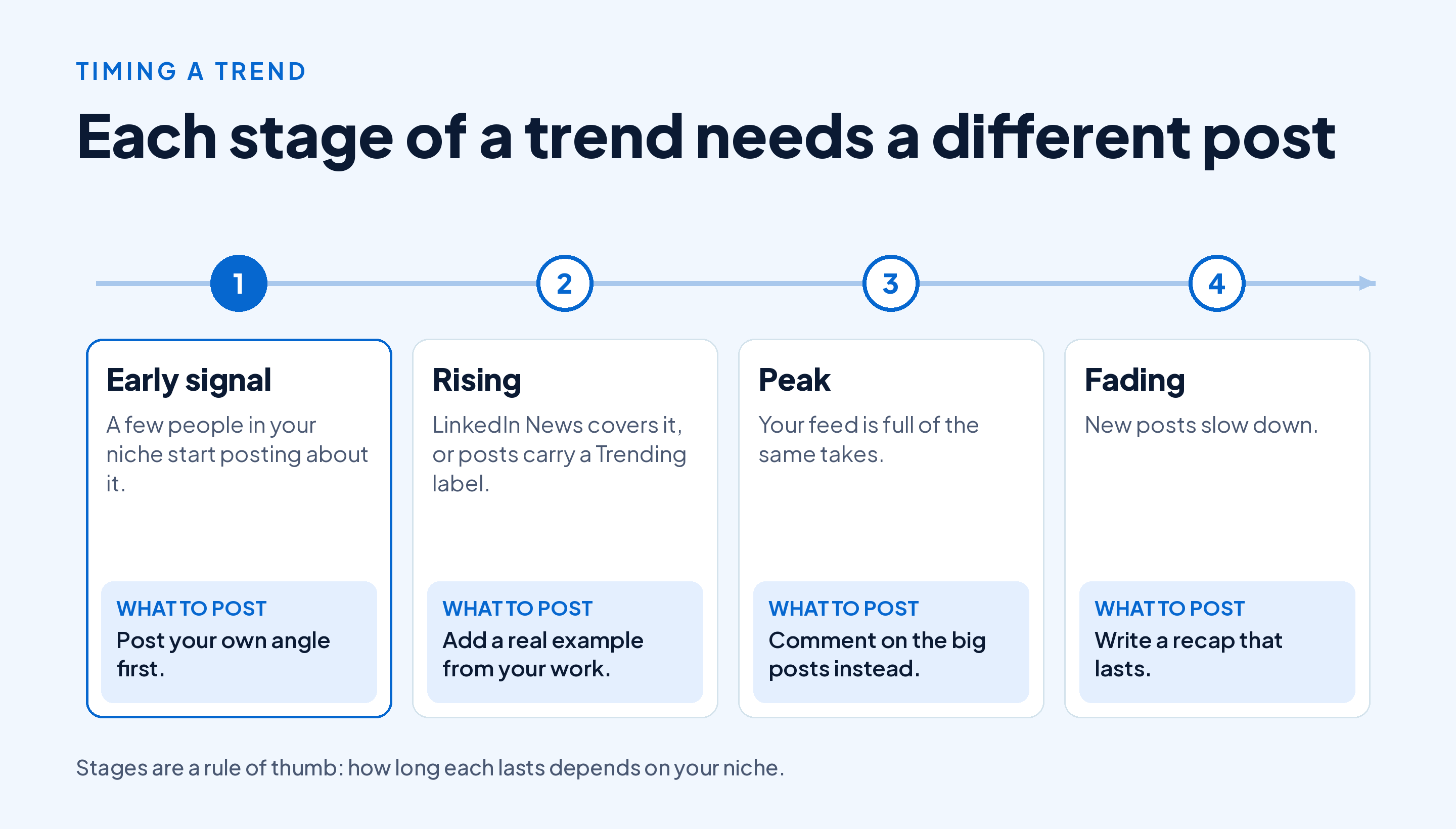
If you spot a trend late, don't force a post. A thoughtful comment on a popular post can reach more people than a late post of your own, and a recap written once the noise dies down often lasts longer than the hot takes.
When you're short on ideas, Draftly's Idea Generator suggests four to six post ideas per topic, based on trends, questions and conversations your audience cares about.
Takeaway: Post early with an angle, or late with a recap; at the peak, comment instead.
Conclusion
To discover trending topics on LinkedIn, follow LinkedIn News, watch for Trending labels in your feed, and keep up with the people, hashtags and groups in your niche. Then use your own analytics and polls to decide which trends your audience cares about.
Narrow every broad trend to your niche with an example of your own, and match the post to the stage of the trend: an angle early, a comment at the peak, a recap at the end.
Want help turning trends into posts every week? Start Draftly's free plan and write five LinkedIn posts a month, no card needed.