Most content calendars don't fail because of a bad template. They fail because they get set up once, in a burst of motivation, and never opened again.
If you've posted on LinkedIn consistently for a while, you already know the pattern: three posts one week, nothing for the next two, then a slightly panicked catch-up post that starts with "I know I've been quiet lately." A content calendar fixes this, but not because it's a magic productivity object. It works because it moves the decision of what to post from every single morning to one sitting a week or two in advance, which is a much easier decision to make well.
What Actually Goes Into a Content Calendar
It doesn't need to be complicated. A spreadsheet, a Notion board, or even a shared doc all work fine, what matters is that five things get tracked for every post:
Date: when it's going out, not just "sometime this week."
Pillar or topic: which recurring theme this post belongs to.
Format: text post, carousel, poll, video, article.
Hook or topic line: the actual angle, even in rough form, so future-you isn't starting cold.
Status: idea, draft, scheduled, published. Enough to see at a glance what's actually ready to go.
That's genuinely it. People overbuild these things with columns for engagement predictions and audience personas before they've posted twice. Start minimal, and add complexity only once the simple version has actually been used for a month.
Setting It Up, Step by Step
With those five fields in mind, here's the actual process, start to finish.
1. Pick where it lives. A Google Sheet or Notion table both work fine, don't overthink this choice. What matters is that it's somewhere you'll actually open again, not that it's the fanciest option.
2. Create the five columns above: Date, Pillar, Format, Hook/Topic, Status. Set up once, reused every week.
3. Write your pillar list at the top of a separate tab or a pinned note: 3 to 4 recurring themes, no more. If you're stuck here, look back at what you've already posted or talked about most, the pillars are usually already visible in your history.
4. Block 30 to 60 minutes this week specifically to plan, not write, the next one to two weeks. Go row by row: pick a date, assign a pillar, note the format, and jot a rough hook, even a single sentence is enough at this stage.
5. Batch-write the actual posts in a separate sitting (more on this below), then move each row's status from Idea to Draft to Scheduled as it moves through that process.
6. Set a recurring reminder, weekly or every other week, to refill the calendar before it runs empty. This is the step people skip, and it's the one that actually determines whether the calendar survives past the first month.
Does LinkedIn Have Its Own Content Calendar?
Not really, and this trips people up. LinkedIn's native scheduler lets you queue a post between one hour and three months out, which is genuinely useful, but it doesn't give you a calendar view, recurring slots, or any way to plan pillars and formats across a week or month. It's a scheduling button, not a planning tool, and it only handles one post at a time with no bulk scheduling. That's the actual reason so many people end up building their own calendar in a spreadsheet or Notion instead of relying on LinkedIn directly, the planning layer just isn't there natively.
One thing worth correcting: a lot of still-circulating advice claims you can't edit a post once it's scheduled, only delete and redo it. That was true at one point, but LinkedIn quietly rolled out full editing of scheduled posts, text, media, and timing, so you can fix a typo or swap an image without starting over. Worth knowing since a fair amount of content on this topic still gets it wrong.
Picking Pillars So You're Never Starting From a Blank Page
Content pillars are just the 3 to 4 recurring themes you post about, chosen based on what you actually know and what you want to be known for. For most people that's some mix of industry insight, how-to advice, personal or behind-the-scenes stories, and opinions or hot takes. Having a fixed set of pillars means every planning session starts with "what's this week's how-to post about" instead of "what should I possibly write about," which is a much smaller, much less intimidating question. If you're regularly stuck on the topic itself rather than the format, a running list of post ideas organized by these same kinds of pillars solves that specific problem.
Content Pillars in Practice
Naming a pillar ("industry insight") is easy. What trips people up is knowing what actually fits under it. A quick reference helps:
Industry insight, trends, news, or data in your field, with your own read on it. Good formats: text post, carousel.
How-to / tactical, a specific process, checklist, or framework your audience can actually use. Good formats: carousel, document post.
Personal story, a real moment, mistake, or lesson, told plainly rather than dressed up. Good format: text post.
Opinion / hot take, a perspective that pushes back on common advice in your field. Good formats: text post, poll.
Three or four pillars is enough. The goal isn't coverage, it's making sure that when it's time to plan, you're choosing from a short list instead of staring at nothing.
Matching Format to Purpose
Not every idea belongs in the same format. A few rough patterns worth knowing: text posts are the fastest to write and tend to drive the most comments, which makes them a solid default for stories and opinions. Carousels take longer to put together but hold up well for step-by-step or checklist content, and tend to get saved more often, which keeps them showing up in feeds longer. Polls are the lowest-effort way to prompt engagement but work best used sparingly, since a feed full of polls starts to feel thin. Video takes the most effort but tends to hold attention longest when it lands. A calendar that leans entirely on one format, usually text, isn't wrong, but mixing in even one carousel or poll a week tends to broaden who actually sees your content.
The Posting-Mix Rules Worth Knowing
Search around for LinkedIn content strategy for more than five minutes and you'll run into a few named rules, usually referenced without much explanation. Here's what they actually mean and where each one is useful.
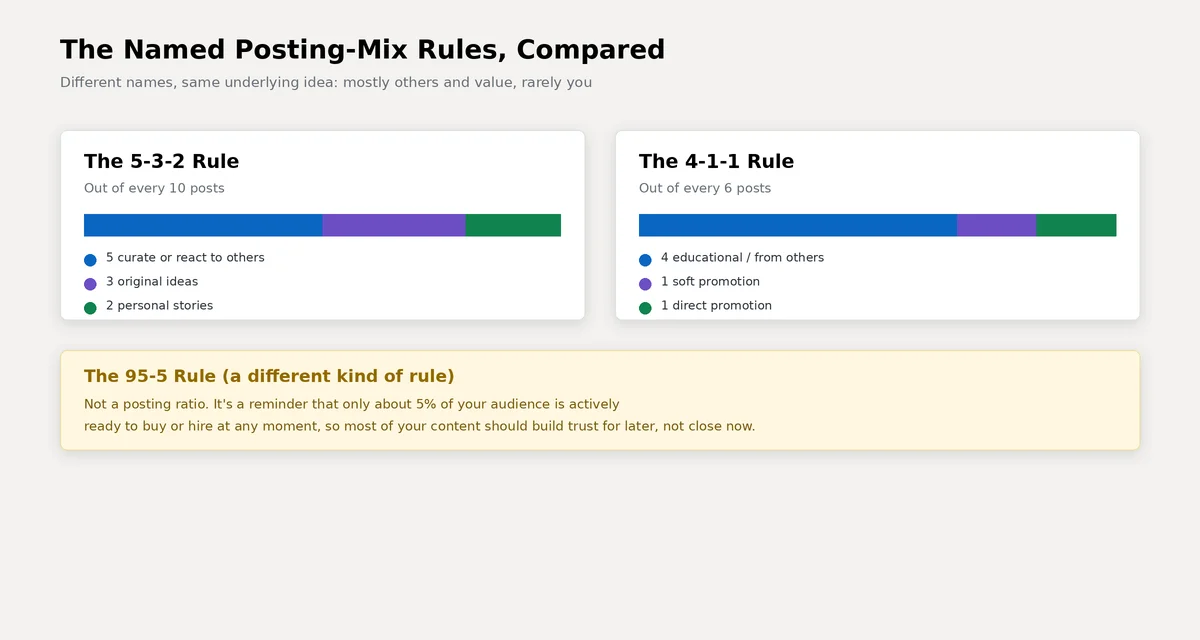
The 5-3-2 rule: out of every 10 posts, 5 react to or curate other people's content, 3 are your own original ideas, and 2 are personal, more human stories. It's a reasonable default if you're not sure where to start.
The 4-1-1 rule: out of every 6 posts, 4 should be educational or from other sources, 1 a soft mention of your own work, and 1 a direct promotion. It's a bit more sales-aware than the 5-3-2 rule, useful if you're posting for a business page specifically.
The 95-5 rule: not a ratio at all, more a reminder that only about 5% of any audience is actively ready to buy or hire at a given moment. It's the reasoning behind why most of a calendar should build trust and visibility rather than push for immediate action.
None of these are rules in the enforced sense. They're starting ratios, useful precisely because they stop you from either mass-reposting other people's content or making every single post about your own business.
A Simple Weekly Structure to Copy
A workable default: one industry insight, one how-to or educational post, one personal story, and one reaction to someone else's content or a relevant news item, spread across the week rather than clustered together. Two to five posts a week is a reasonable range for most people, more matters less than showing up on a rhythm you can actually sustain. If timing is the piece you're unsure about, the best time to post on LinkedIn is worth a look, though consistency matters more than hitting an exact hour.
Batching: Write Once, Post All Week
The single biggest shift that makes a calendar stick is batching: writing several posts in one sitting instead of one post per day. Pick a block, an hour on a Sunday, thirty minutes twice a week, whatever fits, and write against your pillar list rather than starting from nothing each time. Most people find the second and third post in a batch come faster than the first, since you're already in the right headspace. If the actual writing is the slow part rather than the planning, a clear structure for the post itself speeds that up considerably.
A batching session in practice looks like this: open the calendar, look at the next 3 to 5 rows that are still marked Idea, and write those posts in order, pillar by pillar, without switching between formats mid-session. Draft everything first, then go back and edit once with fresh eyes rather than polishing each post individually as you go. Update each row's status to Draft or Scheduled as you finish it, so the next time you open the calendar, it's obvious exactly what's left to do.
Reviewing Without Overthinking It
Once a week or two, spend ten to fifteen minutes looking at what actually got engagement versus what didn't. You're not looking for a perfect formula, just a rough pattern: did the how-to post outperform the opinion post this month? Was Wednesday better than Monday for your specific audience? Adjust the calendar slightly and move on. A content calendar that gets revisited occasionally beats one that was perfectly designed once and never touched again.
Three Starter Calendars You Can Copy
Seeing a filled-in week is usually more useful than another explanation of the concept. Adjust the pillars and topics to your own field, but the shape of these three works across most industries.
Light schedule (3 posts/week), good for consultants and freelancers
Monday, industry insight, text post: your take on something happening in your field this week.
Wednesday, how-to, carousel: a framework or checklist related to a problem you solve for clients.
Friday, personal story, text post: a specific lesson from a recent project, not a generic one.
Active schedule (5 posts/week), good for marketers and founders
Monday, how-to, carousel: something practical your audience can use this week.
Tuesday, industry insight, text post: a data point, report, or trend with your read on it.
Wednesday, social proof, image post: a result, quote, or before-and-after from your own work.
Thursday, personal story, text post: a mistake or turning point, told plainly.
Friday, opinion, poll or text post: a lighter, more opinionated post to close the week.
Personal brand schedule (4 posts/week), good for job seekers and career switchers
Monday, career lesson, text post: something you learned the hard way.
Tuesday, tactical advice, carousel: a step-by-step guide tied to your specific expertise.
Thursday, behind the scenes, image post: what your actual day-to-day work looks like.
Friday, engagement, poll or question: something that invites your network to respond, not just read.
A Few Habits That Keep a Calendar Alive
Leave room for reactive posts. If something genuinely newsworthy happens in your industry this week, write about it instead of forcing the planned topic. A calendar is a plan, not a contract.
Repurpose what already worked. If a text post got real engagement, there's nothing wrong with turning it into a carousel a few weeks later, or reposting it as-is after a couple of months for people who missed it the first time.
Plan around dates you already know about. Industry conferences, product launches, or seasonal moments in your field are worth marking on the calendar a month out, so you're not scrambling to react the week of.
Conclusion
A LinkedIn content calendar doesn't need to be sophisticated to work. It needs five basic fields, a short list of pillars so you're never starting cold, a rough posting mix so you're not either spamming your own promotions or disappearing into other people's content, and a habit of batching instead of writing under pressure every morning. The version that survives past week three is almost always the simplest one you'll actually keep opening.
The calendar itself is really just the operational layer sitting underneath a bigger LinkedIn content strategy, the pillars, formats, and posting habits work because of decisions made at that level. Get that part right first, and the calendar mostly just keeps you honest about following through on it.