
LinkedIn Sales Navigator costs $119.99 a month for Core and $159.99 a month for Advanced, per license, before tax. Pay for a year up front and Core drops to $1,079.88 ($89.99 a month) while Advanced comes to $1,799.88 ($149.99 a month). Advanced Plus has no public price; LinkedIn quotes it per team.
Those are the US list prices on LinkedIn's plan page. What you pay can shift with your country, tax and the device you buy on, and the right plan depends far more on how you sell than on the sticker price.
This guide breaks down every plan's monthly and yearly cost, the month when yearly billing starts to pay off, what a team of three or five costs, what one InMail really costs you on each plan, and how to try Sales Navigator without getting charged for a month you didn't use.
How Much Is LinkedIn Sales Navigator? Every Plan at a Glance
Sales Navigator comes in three plans, all priced per license. Here's what each one costs in the US:
| Plan | Billed monthly | Billed yearly | Yearly, per month | Yearly saving | Built for |
|---|---|---|---|---|---|
| Core | $119.99 | $1,079.88 | $89.99 | 25% | Individual sellers |
| Advanced | $159.99 | $1,799.88 | $149.99 | 6% | Sales teams |
| Advanced Plus | Custom quote | Custom quote | Custom quote | Not published | Teams that sync with a CRM |
All of these come from LinkedIn's Sales Navigator plans and pricing page, which also says the prices are estimates that may exclude VAT, GST and promotional discounts, and that slight variations may occur across device types.
Advanced Plus pricing depends on your team's size, your CRM integration and how much onboarding and training you need. You get a number by clicking Request demo for pricing and talking to LinkedIn's sales team.
You'll still see older guides quoting $99.99 for Core or $179.99 for Advanced. Go by the plan page, and by the price shown when you start checkout while signed in.
Takeaway: If you only need one number, Sales Navigator Core is $119.99 a month, or $1,079.88 a year, in the US.
What Each Sales Navigator Plan Costs and What You Get
Every plan includes the same 50 InMail credits a month, more than 50 advanced search filters, Account IQ and Lead IQ (AI summaries of a company or a person), Relationship Explorer, Relationship Map, alerts and Message Assist for AI drafted messages. The price steps up for team and CRM features, not for more messages.
Core: $119.99 a month or $1,079.88 a year
Core is the plan for one person who prospects on their own. You get the full lead and account search with 50+ filters, Lead IQ and Account IQ, alerts on job changes and new content, and the 50 monthly InMails.
What Core leaves out is everything built for teams: TeamLink introductions through colleagues' networks, Smart Links for tracking shared content, Buyer Intent signals, team reporting and centralized billing.
Advanced: $159.99 a month or $1,799.88 a year
Advanced adds those team tools. The ones that matter most day to day are TeamLink, which shows when someone at your company is connected to a prospect, and Buyer Intent, which flags accounts showing interest in your company. It also adds CSV upload for your book of business and a dedicated account team if you buy through a sales rep.
You can start a trial or buy up to five Advanced licenses online from a desktop, or one license in the LinkedIn app. After the first license is active, a Full Admin adds and assigns more from the LinkedIn Admin Center.
Advanced Plus: custom pricing
Advanced Plus is Advanced plus deep CRM sync. It adds integrations with Salesforce, HubSpot, Microsoft Dynamics, Oracle and others, lead and contact creation in your CRM straight from Sales Navigator, CRM embedded profiles, custom ROI reporting and Sales Navigator alerts inside Microsoft Teams. There's no free trial for this plan.
Takeaway: Pay for Advanced only if you'll use TeamLink or Buyer Intent every week; otherwise Core gives you the same search and the same InMails.
Monthly vs Yearly Billing: When Paying Upfront Pays Off
Yearly billing saves real money on Core and very little on Advanced. Paying monthly for 12 months costs $1,439.88 on Core and $1,919.88 on Advanced, so a year upfront saves you $360 on Core but only $120 on Advanced.
The catch is commitment. A yearly plan only beats monthly if you keep Sales Navigator past a certain point:
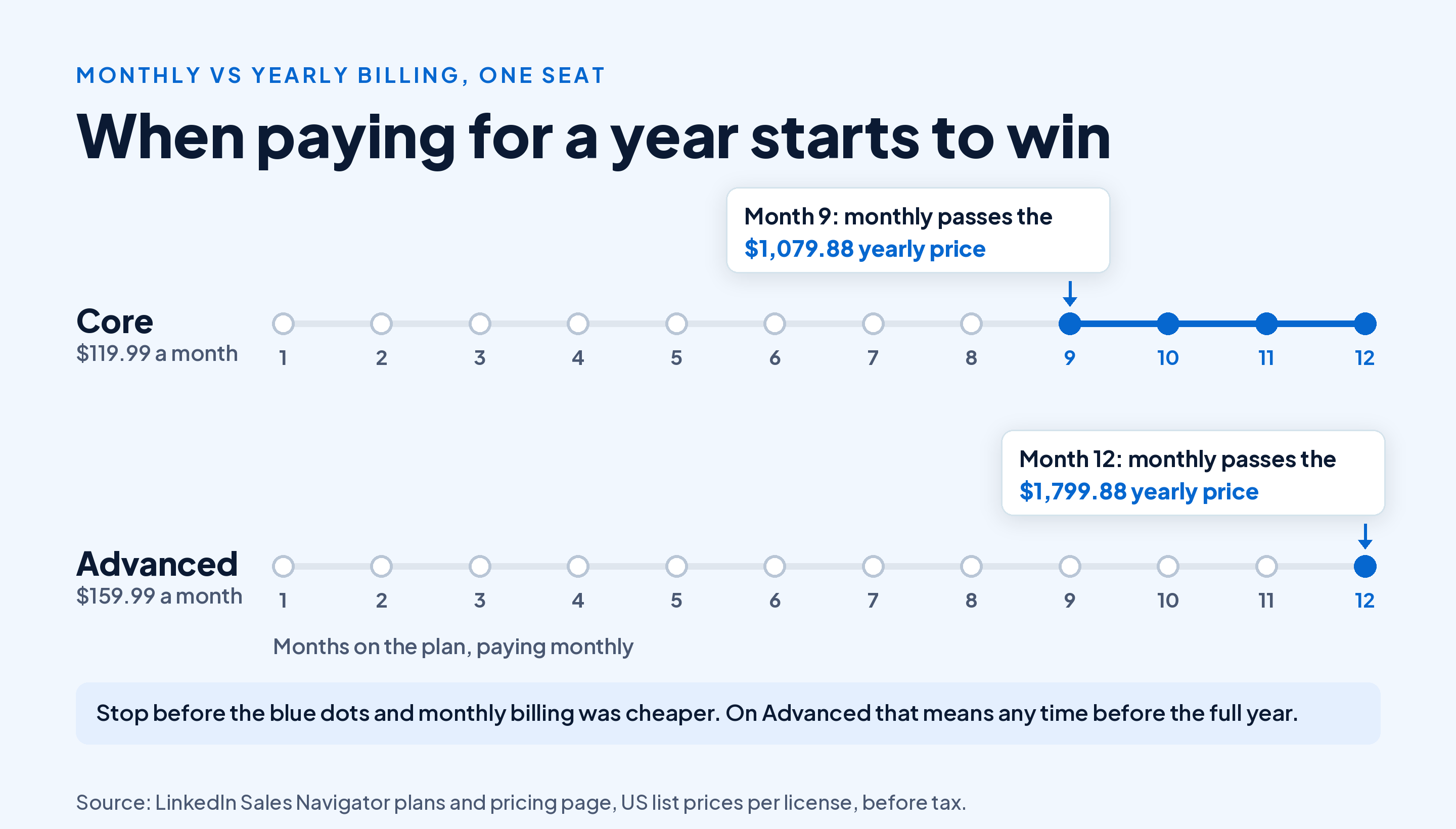
On Core, nine monthly payments ($1,079.91) already cost more than the $1,079.88 yearly price. So if you're confident you'll prospect for at least nine months, the yearly plan wins.
On Advanced, eleven monthly payments add up to $1,759.89, still under the $1,799.88 yearly price. You only come out ahead on the yearly plan if you keep it for the full twelve months, and in exchange you lose the option to cancel at the end of any month.
Cancelling works differently on each. A monthly plan cancels at the end of the current month, while a yearly plan cancels at the end of the paid year. LinkedIn's plan page doesn't promise a refund for the unused part of a yearly plan, so treat the yearly price as money spent.
Takeaway: Go yearly on Core if you'll use it for nine months or more, and stay monthly on Advanced unless you're sure of the whole year.
What Sales Navigator Costs for a Team
Sales Navigator is priced per seat, with no published volume discount on Core or Advanced. So a team's cost is the seat price times the number of reps:
| Seats | Core, monthly billing (per year) | Core, yearly billing | Advanced, monthly billing (per year) | Advanced, yearly billing |
|---|---|---|---|---|
| 1 | $1,439.88 | $1,079.88 | $1,919.88 | $1,799.88 |
| 3 | $4,319.64 | $3,239.64 | $5,759.64 | $5,399.64 |
| 5 | $7,199.40 | $5,399.40 | $9,599.40 | $8,999.40 |
For a five person team on yearly billing, Advanced costs $3,600 a year more than Core. That's the price of TeamLink, Buyer Intent, Smart Links and team reporting across the team.
A quick way to decide: if your reps share accounts and often need a warm introduction from a colleague, TeamLink alone can be worth $720 per seat per year. If each rep works their own territory and rarely asks for an intro, Core seats on yearly billing are the cheaper way to give everyone the same search.
Advanced Plus seats are sold only through LinkedIn's sales team, so if your team needs CRM sync, ask for a quote for the whole team before you buy Advanced seats one by one.
Takeaway: Multiply the seat price by your headcount before you pick a plan; the Core to Advanced gap grows fast on a team.
Sales Navigator Cost Outside the US
LinkedIn sets local prices in four other currencies on the same plan page, and they aren't straight conversions of the US price:
| Currency | Core monthly | Core yearly | Advanced monthly | Advanced yearly |
|---|---|---|---|---|
| US dollar | US$119.99 | US$1,079.88 | US$159.99 | US$1,799.88 |
| British pound | £94.99 | £959.88 | £130.00 | £1,499.88 |
| Euro | €120.99 | €1,088.88 | €148.21 | €1,693.88 |
| Canadian dollar | C$144.99 | C$1,199.88 | C$179.99 | C$2,039.88 |
| Australian dollar | A$154.99 | A$1,499.88 | A$189.99 | A$2,159.88 |
These may exclude VAT or GST, so expect a higher total at checkout where your country taxes digital subscriptions. For any other currency, you see the local price only after you sign in and click a trial button.
Takeaway: Check the price while signed in, in your own country, before you budget from any table, this one included.
What One InMail Costs on Each Plan
InMail is the one feature people most often buy Sales Navigator for, so it's worth knowing what each message costs. Every Sales Navigator plan includes 50 InMail credits a month, compared with 15 on Premium Business and 30 on Premium All-in-One, according to LinkedIn's Sales Navigator vs Premium comparison.
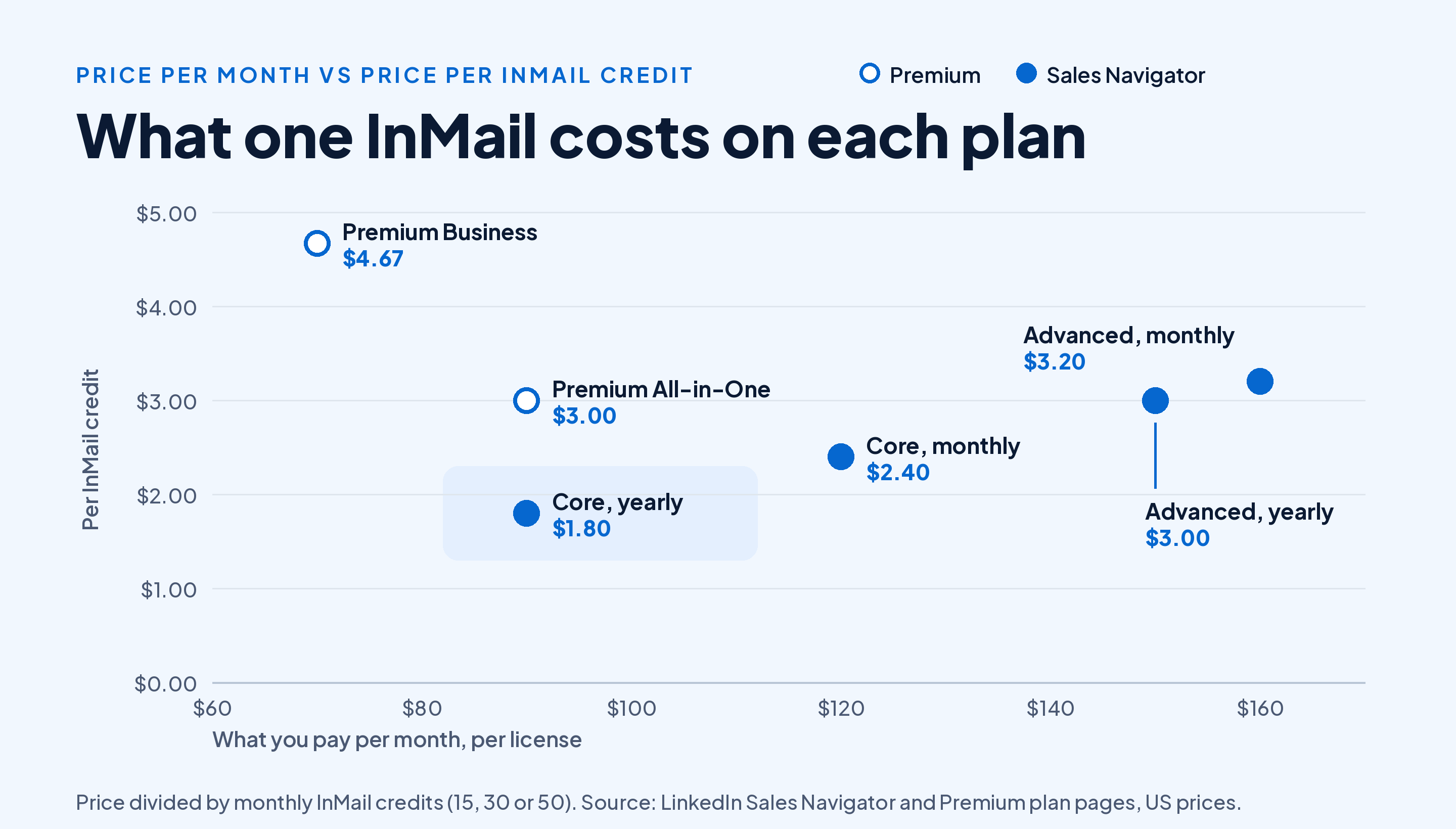
Divide the monthly price by the credits and Sales Navigator Core on yearly billing comes out cheapest at $1.80 a credit, against $4.67 on Premium Business. Advanced costs more per credit than Core because you pay extra for team features while the InMail allowance stays at 50.
Two rules make credits stretch further. Unused credits roll over up to a cap of 150, and you get a credit back when someone responds to your InMail within 90 days, as both lemlist's InMail credit guide and PhantomBuster's guide to InMail credits explain.
So a short, specific InMail that gets a reply, even a polite no, costs you nothing. A long pitch that gets ignored costs the full credit. Our guide to what InMail is and when it's worth sending one covers what to send.
Takeaway: If InMail is your main reason to buy, Core on yearly billing gives you the lowest cost per message of any LinkedIn plan.
Sales Navigator vs LinkedIn Premium: Which Costs Less for What You Need?
Sales Navigator includes everything in Premium Business, plus the sales tools. Premium Business starts at $69.99 a month and Premium All-in-One at $89.99, so Core costs $50 a month more than Premium Business for the same seat.
| What you need | Cheapest plan that covers it | Monthly price |
|---|---|---|
| Wider people search and a few InMails | Premium Business (15 InMails) | $69.99 |
| Hiring and boosting credits on top of outreach | Premium All-in-One (30 InMails) | $89.99 |
| 50+ sales search filters, Lead IQ and buyer alerts | Sales Navigator Core (50 InMails) | $119.99 |
| Team intros, Buyer Intent, shared reporting | Sales Navigator Advanced | $159.99 |
| Two way sync with your CRM | Sales Navigator Advanced Plus | Quote |
The trade-off runs both ways. If you move from Sales Navigator down to Premium, you lose the sales search filters, buyer alerts, TeamLink and CRM integrations.
If you're still weighing the Premium side, our breakdown of every LinkedIn Premium plan's monthly and yearly price has the full numbers, and our guide to whether a paid LinkedIn plan is worth it for you covers who gets the least out of upgrading.
Takeaway: Buy Sales Navigator when you prospect every week; if you mostly search for specific people, Premium Business costs $600 a year less on monthly billing.
Is There a Free Sales Navigator Trial?
Yes, for Core and Advanced, but not for Advanced Plus. The eligibility rules are narrow:
- No paid plan right now. You can't be on any paid LinkedIn subscription, Premium included.
- No trial in the past 365 days. Any LinkedIn free trial counts, so a Premium trial last spring rules you out.
- A card on file. LinkedIn asks for payment details to start, and emails you a reminder seven days before the trial ends.
That first rule catches people. If you're on Premium and want to test Sales Navigator, you'd have to cancel Premium and wait for it to end first. Our guide to cancelling a Premium subscription walks through that part.
To start a trial on desktop:
- Sign in to LinkedIn in a browser on your computer.
- Open the Sales Navigator plans and pricing page linked above.
- Click Try Core for free or Try Advanced for free.
- Pick monthly or yearly billing and check the price shown for your country, with tax.
- Add your payment details and confirm.
In the LinkedIn app on iPhone or Android, you can buy a single license, but prices can vary slightly across device types. Compare the in-app price with the browser price before you tap to confirm.
Plan your trial like a sprint. Before day one, write down the accounts you'll research, the searches you'll run and the number of InMails you'll send. Then put a calendar reminder two days before the trial ends, and decide based on replies, not on how good the search felt.
Takeaway: Check your trial eligibility before you need Sales Navigator, and use the trial with a written test plan and an end date.
Is LinkedIn Sales Navigator Worth the Cost?
It's worth it when it saves you more selling time than it costs. A simple check for Core on yearly billing: $89.99 a month is about $4.50 per working day, if you work 20 days a month. If the search filters and alerts save you 15 minutes a day of manual searching, that's a fair trade for most quota carrying reps.
It's usually not worth it if:
- You send fewer than 10 InMails a month and mostly connect with 2nd degree contacts, where a free connection request does the job.
- You only need to find specific people. Premium Business, or plain LinkedIn search, covers that. Our walkthrough on searching LinkedIn for people by name shows how far the free search goes.
- You won't build a routine. Sales Navigator pays off for people who check alerts and run targeted searches several times a week.
If you do buy it, our guide to building lead lists and alerts in Sales Navigator shows the daily routine that makes the seat earn its cost.
A cheaper path exists for one part of the job. Draftly's LinkedIn Outreach add-on finds leads from a free LinkedIn account, without Sales Navigator, and runs invite and follow-up sequences from your own browser that stop as soon as someone replies. It's $19 a month, and it's built for connection request outreach, not for Sales Navigator's account research, Buyer Intent or CRM sync. If you need those, Sales Navigator is the right tool.
Takeaway: Price Sales Navigator against the hours it saves you each week, not against the free version of LinkedIn.
Conclusion
Sales Navigator Core costs $119.99 a month or $1,079.88 a year per seat in the US, and Advanced costs $159.99 a month or $1,799.88 a year. Advanced Plus is quoted per team.
Start with Core unless your team will use TeamLink or Buyer Intent every week. Go yearly on Core once you're sure of nine months, stay monthly on Advanced unless you'll keep it all year, and multiply by your headcount before you commit. Check your trial eligibility early, and run the trial with a written test plan.
Once Sales Navigator finds the right people, give them posts worth reading when they check your profile. Start Draftly's free plan and write five LinkedIn posts a month for your prospects, no card needed.